
Anomaly detection flags no-shows and suspiciously long breaks. One-click CSV download for payroll.
Mobile clock-in writes attendance live. The Daily Report shows who's working right now. The Timesheet rolls up the pay period. Download the whole period as a CSV when it's time to run payroll.
Departments
42 staff · 5 anomalies
Cleaners
183 anomalies
Maintenance
141 anomalies
Inspection
61 anomalies
Guest Svc
4
Cleaners · Jun 22 - Jun 28
ScheduledClocked
K. Maslova
A. Ruiz
M. Castillo
A. Tanaka
H. Silverman
C. Brody
Anomalies · This week
Auto-flagged
K. Maslova
LIVELong break · 1h 18m vs 30m
Wed 11:32 → now
A. Tanaka
HIGHNo-show · scheduled 10am Tue
Tue 10:00 AM
M. Castillo
LOWShort clock-out · -2h 12m
Mon 4:48 PM
Scheduled
1,680h
Clocked
1,592h
One-click download
Download CSV for payrollPay run ready
Part of Staff & Time
Built to actually move the work.
Honest hours, easy shift planning, no spreadsheets
100%
GPS-verified hours
What you get
Real hours worked, not spreadsheet guesses
- Mobile clock-in is the source of truth - GPS-verified, photo-backed
- Daily Report - live status of who's working, on break, off
- Timesheet - per-staff hours across any date range, drill in by day
- Anomaly detection flags no-shows, very long breaks, double clock-ins
- One-click CSV download for payroll
Web admin
Two modes, same source of truth.
Same staff, same mobile clock-in data, two different lenses. Toggle the mode to the question you're actually asking - "who's on shift right now?" or "how many hours did each person work this pay period?"
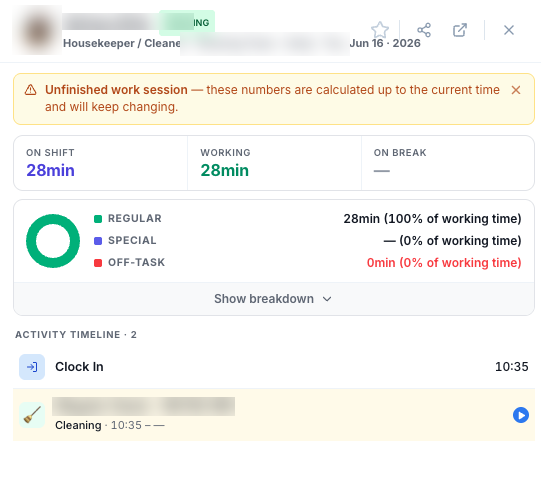
Who's Working / Shift End right now, clock-in time, on-shift / working / break breakdown, plus the activity timeline of the current shift.
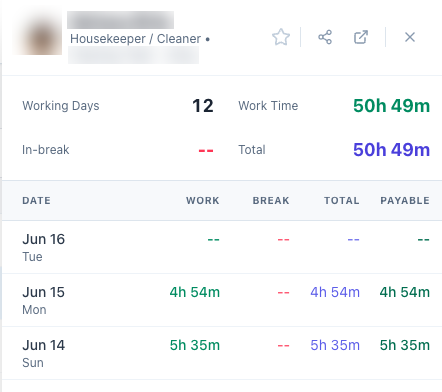
Working Hour · In Break totals per staff over any date range, with per-day breakdown (Work · Break · Total · Payable) - one-click CSV your payroll tool can ingest.
- Filter by Department · Position · Status; search 50+ staff
- Drill into any row → right-side detail panel with the period or live activity
- Unfinished work session warning - calculations stay live until clock-out
- Anomaly flags - no-shows, very long breaks, double clock-ins
- Export Timesheet to payroll (CSV download)
Also in Staff & Time
Other modules in this area
Build the week. Publish to every phone in seconds
Visual week-view shift planner per staff and per property. Conflict warnings catch double-booking, over-hours, and missing certs. Hit Publish and the schedule lands on every staff member's phone instantly.
Learn morePTO and shift swaps approved in one tap
No more WhatsApp threads about Thursday afternoon off. Time-off requests and shift swaps come in as a queue. Approve or reject with one tap; shifts and attendance auto-update.
Learn moreEvery owner, every property, one searchable list
Stop hunting in spreadsheets for an owner's phone number or which units they hold. Add owners with contact info + status, link each to their properties, and find them all in one searchable directory.
Learn moreClock-in from a phone. Live timer. GPS-verified
Field crews clock in from the app - live timer, break tracking, photo proof at clock-out. Hours feed the Timesheet live so payroll input is accurate by clock-out, not assembled from spreadsheets at month-end.
Learn moreSee it all live in 30 minutes.
Walk through Staff & Time - and every other area of RentUP.ai - with someone who runs the platform every day.
Book a free 30-min demo